Tuesday, January 15, 2008

MS SQL quirk

I used sub-query as column output quite often. As shown in the following command SQL command.

select (select top 1 a from b.c=d.c) e from d

However, if you query further based on the sub-query result e, the result is not defined, as shown in the following statement.

select (select top 1 a from b.c=d.c) e, (select top 1 f from g where g.h=e) i from d

The query will run successfully but the resulting data for i is not changing based on the value e which is correct even multiple rows are returned.

The solution is quite simple. We just need to replace the e with the sub-query it represents as shown below:

select (select top 1 a from b.c=d.c) e, (select top 1 f from g where g.h in (select top 1 a from b.c=d.c)) i from d

Thursday, January 10, 2008

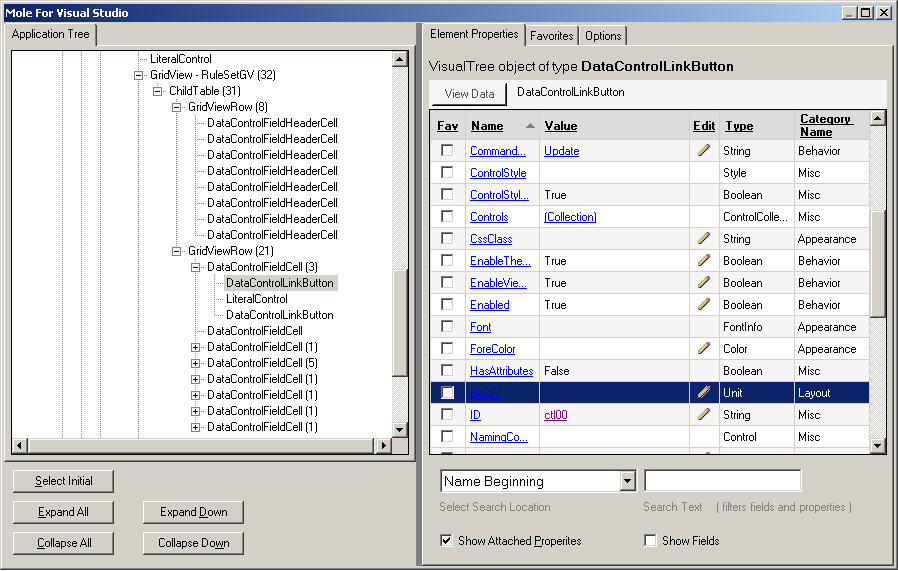
Mole for Visual Studio


I came across a very useful tool called "Mole for Visual Studio" that allow you to visualize the data easily. The project that I am working right now has about 8 level deep in one ASP.NET page. It is hard to keep track of all the objects that created at different the levels. Mole for Visual Studio works like a charm.

Here is the link to the screenshot.

How to monitor text changes in an input box on a web page

I was assigned a task to implement something like Autocomplete control in ASP.NET Ajax Control Tool Kit with JavaScript. The only difference is that instead of displaying a drop drown list like what Autocomplete does, I need to display more rich content.

It took me a while to figure out how to monitor the input text changes in a text box. I created kyepress and mousedown and various other event handlers to start the process to monitor the input text box. It worked in some cases, but failed in others.

In the end, I have to take a look into the source code that implemented Autocomplete control released with Ajax Contrl Took Kit by Microsoft. The correct answer is to intercept focus, blur, and keydown events. In the past, it would not be possible because all the software is not open-sourced. The only solution is to read documentation and use trial and error approach.

Tuesday, January 08, 2008

Referencing type within a generic class

In the following code snippet, an enum class1Enum type is declared with in a generic class Class1<T>. In order to reference to class1Enum type, we have to instantiate the generic class by supplying its type as shown in the declaration of var1 and var2. Another catch is that, although the var1 and var2 are of the same class1Enum type, they are declared in  different classes namely  Class1<int> and Class1<string>, and therefore they are not the same.

    public class Class1<T>
    {
         public T t;
 
        public enum  class1Enum
        {
            a,
            b
        }
     }
 
    public class Class2
     {
        public Class1.class1Enum var; // compile error
 
         public Class1<int>.class1Enum var1;
         public Class1<string>.class1Enum var2;
  
        public Class2()
        {
            var1 = var2; // compile error 
        }
    }

My Sudoku Solver

My first published article about  Sudoku Solver in C# 3.0 back in 2006 when LINQ was still in public beta.

Monday, January 07, 2008

Enum Flags

The following code demostrates how to use enum type in c# as flags.

        [Flags]
        public enum  test
        {
            none = 0,
            a = 0x01,
            b = 0x02,
             c = 0x04,
            d = 0x08
        }
        static  void Main(string[] args)
        {
            test t =  test.none;
            Console.WriteLine(t);
 
            t = t |  test.a; //set bit a
            Console.WriteLine(t);
 
             if (t == test.a) 
                Console.WriteLine( "only bit a is set");
 
            t = t | test.b;  // set bit a
            Console.WriteLine(t);
 
             if ((t & test.a) != 0) //test to see if bit a is set
                 Console.WriteLine(" test bit a is set");
 
            Console .ReadKey();
        }

The implementation I was using is to use the BitArray which is very efficient. The good news is I implemented by using code generation which means I only need to modify the code generation templates and all my generated code will be benefiting. :)


Setting the timeout value when doing unit testing

It is actually quite easy to set the timeout for Microsoft Unit Test. It is shown as the following which set the timeout to 10 minutes:

[TestMethod]
[Timeout(600000)]
public void QuickSearchRegressionTestWithThread() {… }

Actually it the following link provides the comparison of all the fixtures of all the popular unit test suites for the .NET framework.